
The whole service day, connected.
Price book, dispatch, technician app and good, better, best estimates in one workspace built for HVAC shops. One monthly price for your whole company, set by company size, not per technician.
Every truck on one board
New calls land in the Unassigned row. Drag one onto a technician and the day reschedules instantly, with no pop-ups in the way.
The day in the tech’s pocket
Start, pause and finish jobs. Step-by-step workflows, job forms and an equipment scanner that reads the data plate for the technician to check.
Know who’s running long
Driving and on-the-job clocks tick live on the board, so the office sees a late arrival before the customer calls.
Three options, one tap to approve
Good, Better and Best estimates the homeowner compares on their phone. Once accepted, the price is locked and the invoice follows.
See it with your own jobs
A 30-minute walkthrough, set up around how your shop runs.
How to use FieldSummit
Set up your price book once. After that, every call follows the same six steps, from booking to the owner dashboard.
-
Step 1 · Once, at setup
Set up your company price book
Add categories, items, photos, member prices and additional-task (bundled) prices once. Every technician uses the same company prices.
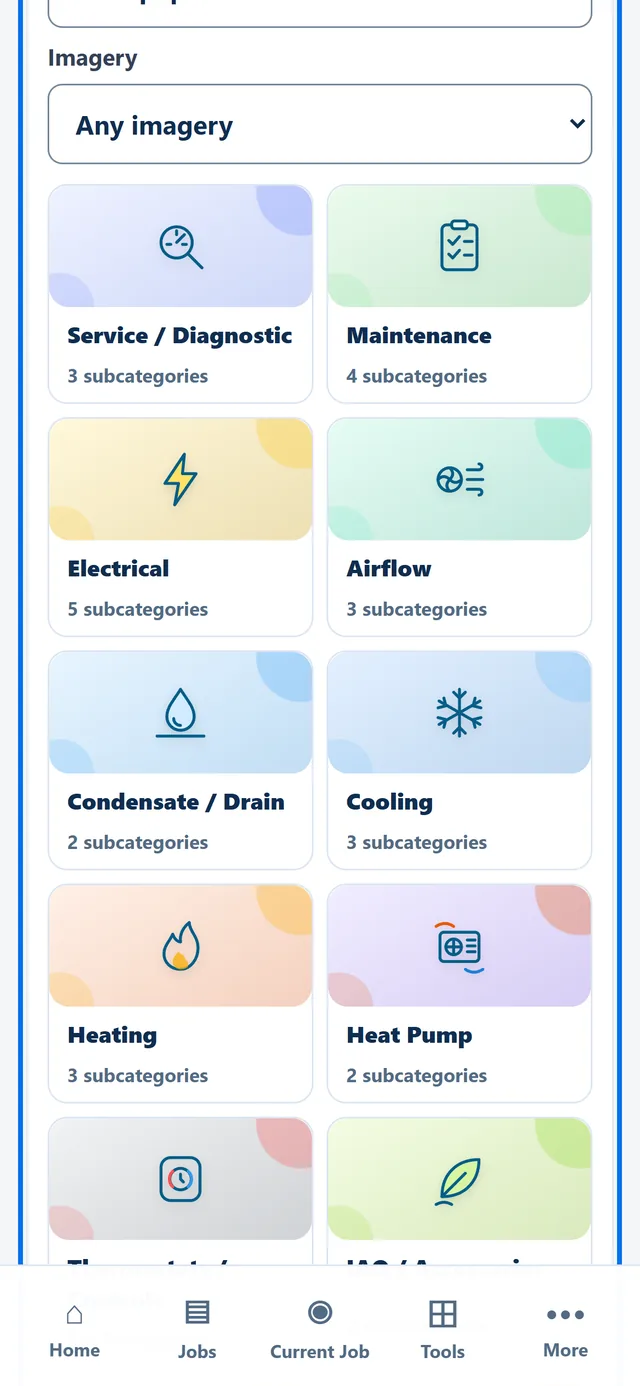
Price book categories. Sample company, fictional data. -
Step 2 · At the office
Book the job and put it on the board
Every technician’s day sits on one dispatch board, hours across the top. Drag a job onto a technician to schedule it.
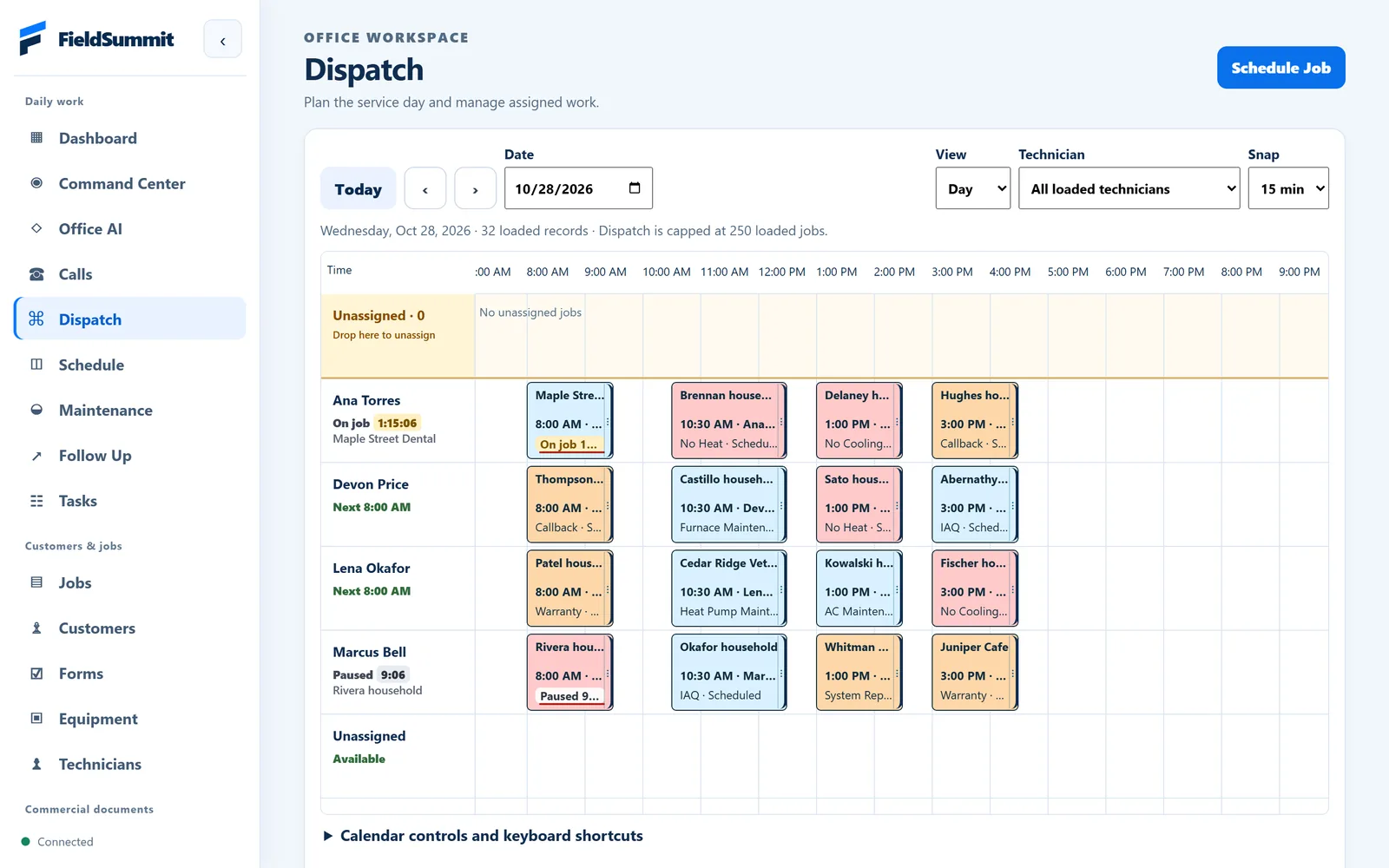
Dispatch board. Sample company, fictional data. -
Step 3 · In the truck
The technician follows the next step
The app shows one clear next step at a time: On my way, Arrived, work through the checklist, write the summary, finish the job.
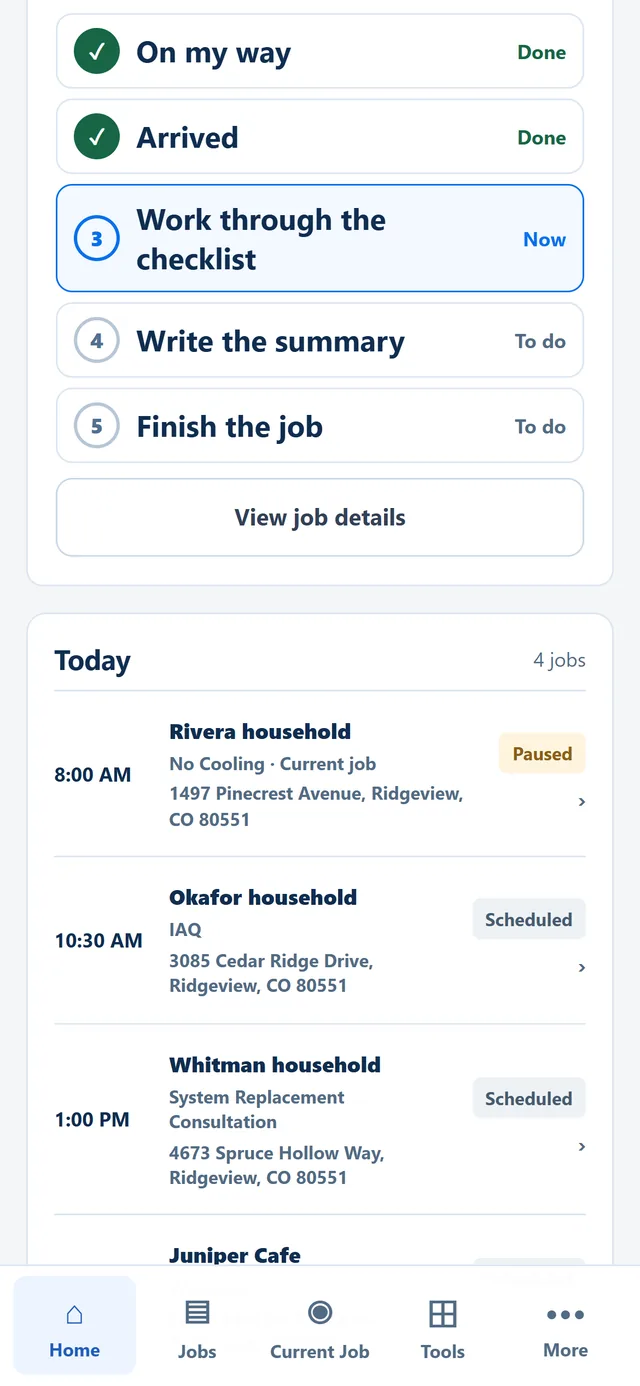
Technician checklist. Sample company, fictional data. -
Step 4 · At the unit
Build good, better and best options
Pick items straight from the price book while on site. Each line shows its member price and its bundled price as an additional task.
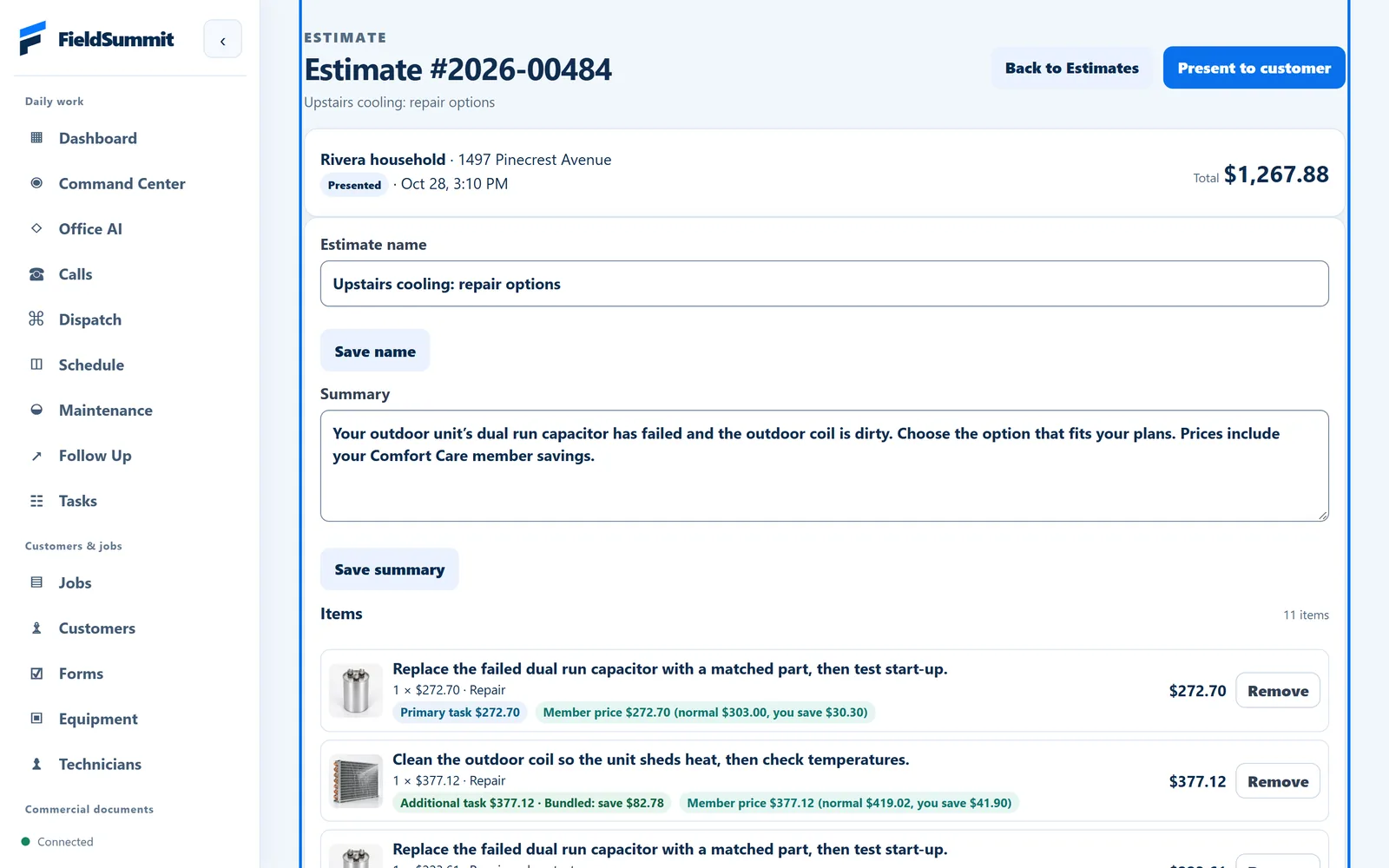
Estimate editor. Sample company, fictional data. -
Step 5 · At the kitchen table
Present the options on the spot
Good, better and best sit side by side, with what each includes and any member and bundle savings you’ve set up.
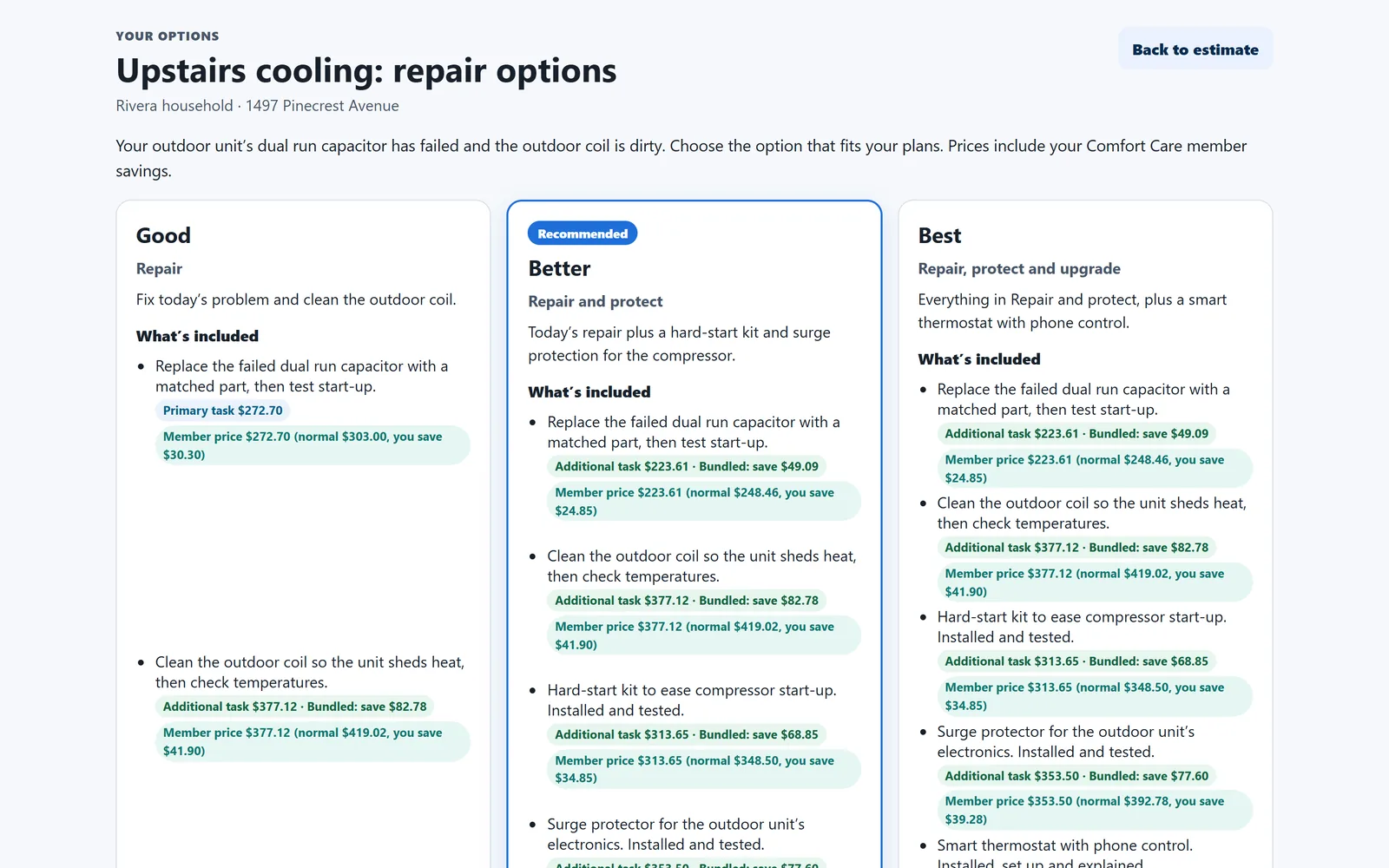
Customer presentation. Sample company, fictional data. -
Step 6 · End of the day
Mark it sold, invoice it, see it on the dashboard
Mark the estimate sold and invoice the work. The owner dashboard counts completed jobs, invoices and sold estimates, compared with last month.
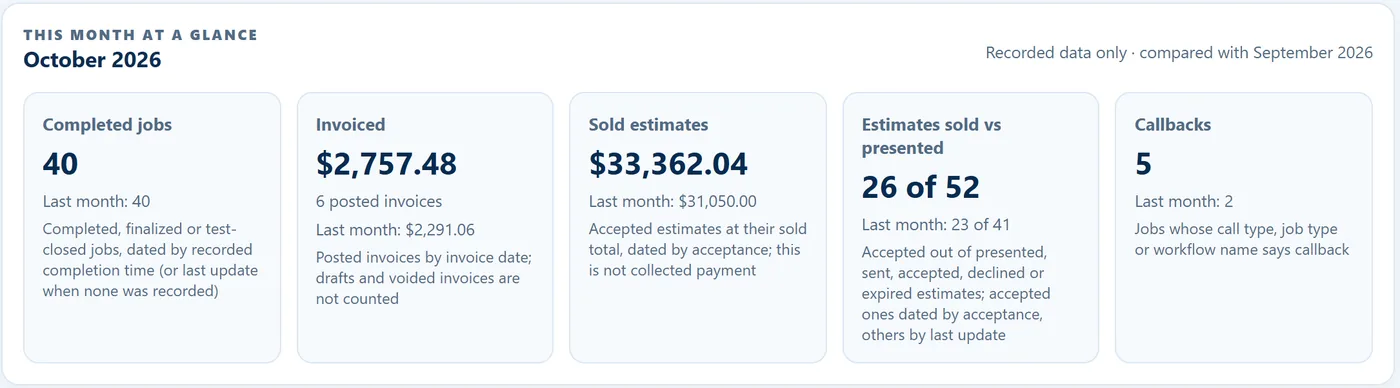
Owner dashboard. Sample company, fictional data.
A price book your customers understand
Give each item a photo and a plain-language description. Show the member price next to the normal price, and use additional-task pricing to show what an add-on costs on the same visit.
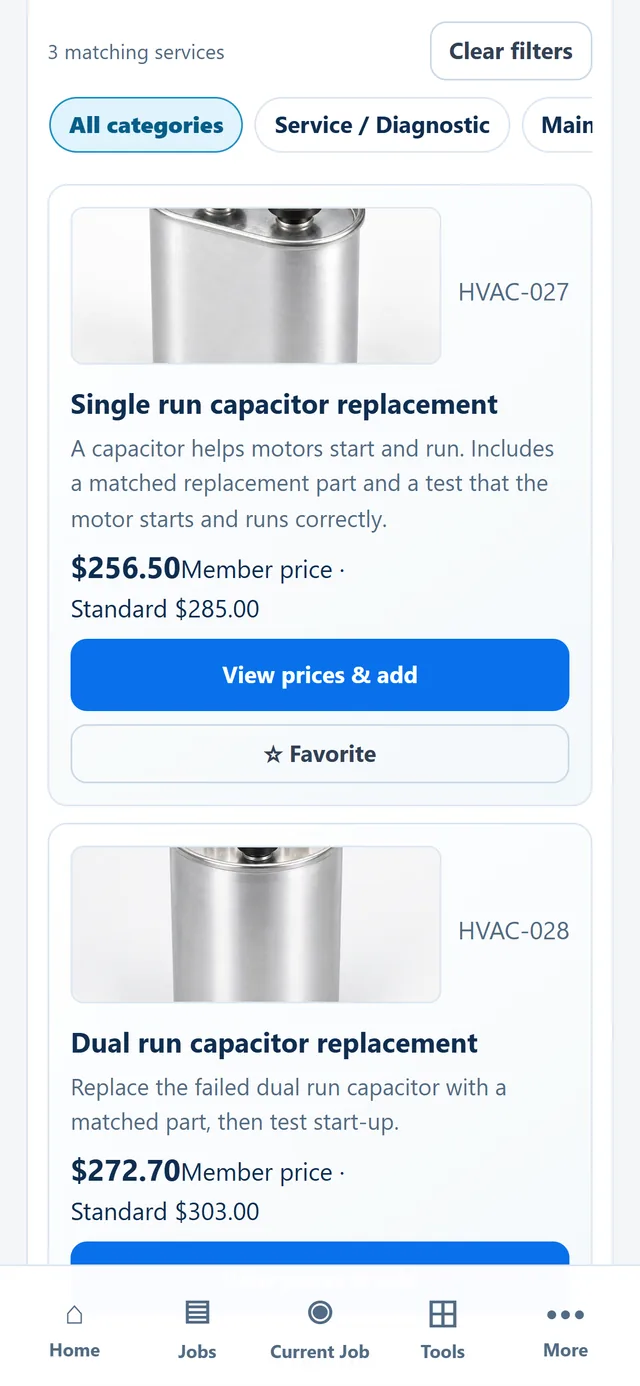
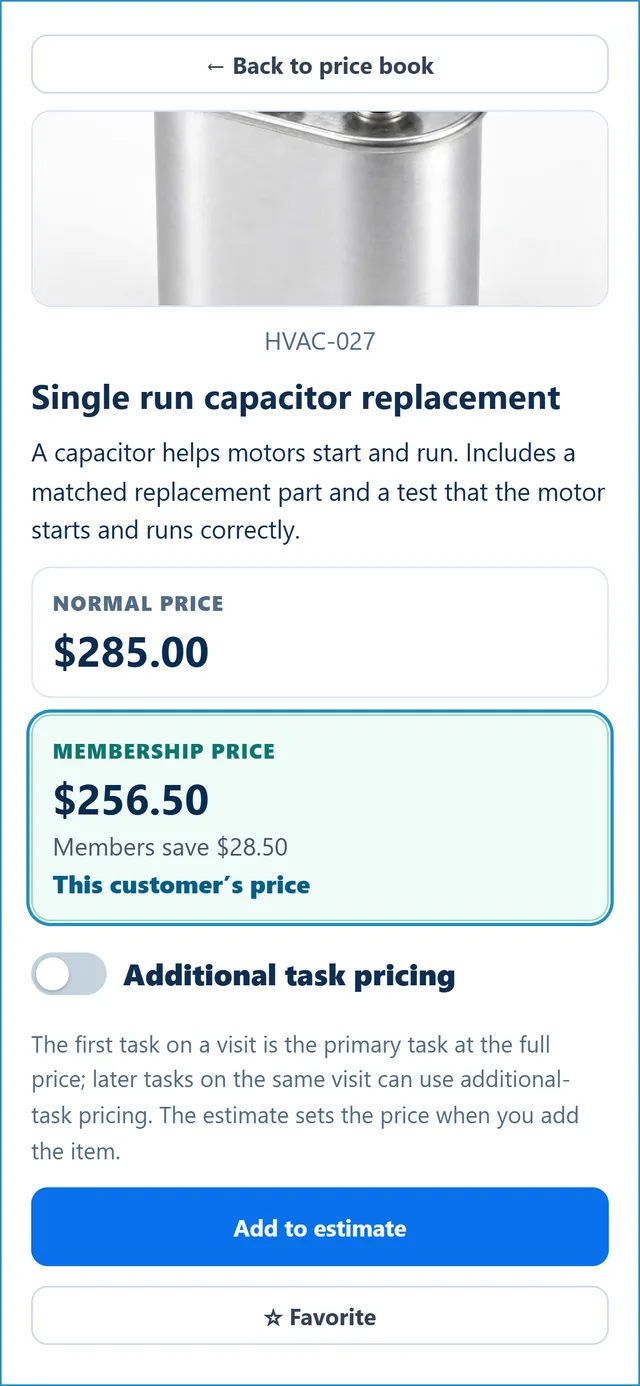
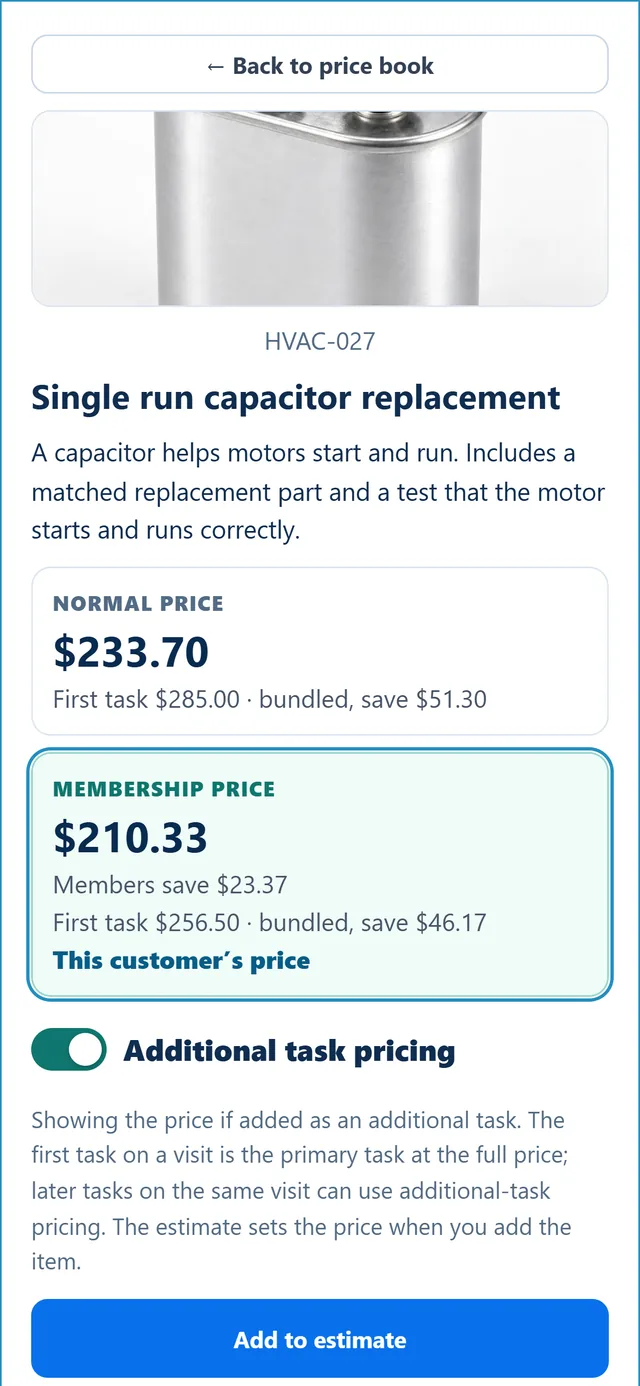
Sample company, fictional data. Prices are the sample price book’s.
Present options, explain prices, track estimates
The parts of FieldSummit your team uses to sell the job and run the day.

Good, better and best options
Present good, better and best options side by side, so the customer sees choices beyond the minimum repair.
Bundled additional-task pricing
Show additional-task pricing for work done on the same visit, so the customer sees the bundled price.
Membership pricing
Show the member prices you set alongside standard prices, on price book items and estimate options.
One dispatch board
Book jobs and see every technician’s schedule on one dispatch board.
An owner dashboard
Completed jobs, invoices, sold estimates and estimates sold versus presented, each compared with last month.
Built for the truck, not the desk
Swipe through a technician’s day. These screens rebuild the real technician app layout, filled with a fictional sample company.
How FieldSummit compares
Read down each column. Member pricing, bundle savings and good, better, best options come on every FieldSummit plan.
As of 3 November 2026, from each company’s own website. Monthly billing, standard prices.
| Feature | Field | Housecall Pro | Jobber | Service |
|---|---|---|---|---|
| Selling the job | ||||
| Price-book item photos | Included | Included | Higher planGrow plan | Price book: Starter. Item photos: package not stated |
| Member price next to normal price | Included | Membership plans: Essentials and up | Not listed | Higher planMemberships: The Works |
| Bundle savings for added tasks, shown to the customer | Included | Bundle discounts offered; showing the saving to the customer not stated | Not listed | Not listed |
| Good, better, best options | Included | Multi-option estimates offered; proposal tool: Essentials | Higher planGrow, as optional line items | Higher planMobile Estimates: Essentials |
| Customer signs on the spot | Included | Included | Included | Higher planPart of Mobile Estimates |
| Follow-up list for unsold estimates | Included | Automated (Pipeline): Max or add-on. Basic list not stated | Automated: Connect and up. Basic list not stated | Offered; package not stated. Automated: Marketing Pro add-on |
| Customer financing | PlannedNot available yet | Included | IncludedThrough Wisetack | IncludedPackage not stated |
| Running the day | ||||
| Drag-and-drop dispatch board | Included | Included | Included | Included |
| Customers book online | Included | Included | Included | Add-onScheduling Pro |
| Step-by-step job checklists | Included | Higher planEssentials and up | Higher planConnect and up | Offered; package not stated |
| Job photos | Included | Photo reports and annotations: Essentials and up | IncludedPhotos attached to jobs | Offered; package not stated |
| Owner dashboard | Included | Included | Included | Advanced Reporting: The Works |
| AI features (what’s included differs) | Higher planSystem + AI plan, credits included | IncludedAI call answering is an add-on | IncludedAI Receptionist: $29/mo add-on | IncludedAtlas; some parts in early access |
| GPS tracking and route planning | Add-on$10 per company per month | Higher planGPS: Essentials. Routes: Max | Higher planRoute optimization: Connect and up | Add-onFleet Pro |
| iPhone and Android apps | PlannedNot available yet. Works in the phone’s browser today. | Included | Included | Offered; package not stated |
| Money and setup | ||||
| Card payments | PlannedNot available yet; fees not announced | IncludedFrom 2.59% | Included2.9% + 30¢ online | Offered; package and rates not published |
| QuickBooks sync | IncludedQuickBooks Online | Higher planEssentials and up | Higher planConnect and up | Offered; package not stated |
| How office users affect the price | IncludedThey don’t; one price per company size | Plans include a set number of users; extra users cost more | Office and field users both count; $29/mo per extra user | Not publishedPriced per technician |
| Free self-setup | IncludedHelp is optional | No setup fee listed | No setup fee listed | Not published |
| Standard monthly price for a 5-technician shop | $179Medium, whole company. $299 with AI. Planned launch price. | $299Essentials, 5 users (HVAC). Max $649, 8 users. | $199Connect, 5 users. Grow $299. | Quote onlyPriced per technician. |
- Competitor features and prices are from each company’s public pricing and help pages, checked 3 November 2026, monthly billing. ServiceTitan does not publish prices. “Planned” identifies an unreleased feature. Release timing and final terms are not guaranteed; the GPS add-on is priced separately. Product names belong to their owners.
- Standard monthly prices without promotions or annual discounts. Housecall Pro shows prices by trade: these are the prices it shows for Heating & Air Conditioning (its general plan list shows Essentials at $189). Where Housecall Pro’s trade view doesn’t say which plan has a feature, its general plan list is used.
- “Higher plan” means the feature is not in that company’s lowest-priced plan (ServiceTitan’s is Starter). “Add-on” means it is sold separately. “Not listed” means we did not find it on the company’s public pages, not that it is unavailable. “Package not stated” means the company offers it but doesn’t say which package includes it.
- FieldSummit prices are planned launch prices; subscriptions aren’t on sale yet. FieldSummit is not affiliated with or endorsed by Housecall Pro, Jobber or ServiceTitan.
What’s in FieldSummit
“Live” means it works in the pre-launch product today. “Planned” means it is not released yet; release timing and final terms are not guaranteed. Subscriptions aren’t on sale yet.
Price book
Categories, item photos, member prices and bundled additional-task prices, shared by every technician.
LiveEstimates
Good, better and best options presented on the spot, with any member and bundle savings you’ve set up, customer signature and a follow-up list.
LiveDispatch board
Every technician’s day on one board, drag to schedule, live job and drive clocks, office permissions.
LiveTechnician app
Works in the browser on any phone: one next step at a time, checklists, job summaries, photos, data-plate scanner and field calculators.
LiveInvoices and owner dashboard
Invoices from the job, and the month at a glance compared with last month.
LiveOnline booking
Customers book a visit from an online booking page.
LiveQuickBooks sync
Automatic sync with QuickBooks Online.
LivePhone apps
Native iPhone and Android apps for technicians. Not released yet.
PlannedOne monthly price for your whole company
Priced by company size, not per technician or per user. Pick the size that covers your technicians, then choose the system on its own or with AI included. These are planned launch prices; subscriptions aren’t on sale yet.
Small
1–3 technicians
System$79/month
System + AI$129/month
1,500 AI credits a month
Medium
4–10 technicians
System$179/month
System + AI$299/month
5,000 AI credits a month
Large
11–25 technicians
System$349/month
System + AI$599/month
12,000 AI credits a month
Enterprise
26–50 technicians
System$649/month
System + AI$1,099/month
25,000 AI credits a month
- One price for the whole company. Office staff are included and don’t add to the price. Published sizes cover 1–50 technicians; moving to a larger size changes the price.
- Every plan includes the core system: price book, dispatch board, technician app (in the browser), estimates and invoices. System + AI and the GPS add-on cost more.
- Extra AI credits will be sold separately; pricing hasn’t been announced. If credits run out, jobs keep working; only the AI features pause until more credits are added.
- GPS tracking and route planning: optional add-on, $10/month per company.
Planned launch prices. Subscriptions aren’t on sale yet. Ask for a walkthrough and we’ll set it up around your shop.
Run the day. Don’t chase it.
Tell us about your shop and we’ll walk you through FieldSummit with your kind of jobs.